


You opened Google Search Console, saw “Crawled, currently not indexed” next to a page that should be ranking, and started reading guides. Most of them told you the same thing: rewrite the content.
Most guides on this skip the part where the answer is sometimes “do nothing.” Some pages legitimately belong in this status, and even when they do not, the cause is often something other than your writing.
So let’s talk about the diagnosis. How to tell when the status is fine, the real causes when it is not, and what to do for each.
What “Crawled, Currently Not Indexed” Actually Means

Crawled, currently not indexed means Google visited your page and chose not to add it to search results. You will see the status in the Page Indexing report inside Google Search Console.
The page will not show up for any search. The reason is usually the quality of the page or your site as a whole. It can also be broken JavaScript rendering, missing internal links, the page being buried too deep in your site, or recent patterns in how Google handles your URLs.
There is a similar-sounding status that means something different, and mixing the two sends you to the wrong fix.
Discovered, currently not indexed means Google knows the URL exists but has not visited it yet. That means Google has not gotten around to it, or your site is not trusted enough yet for Google to make it a priority. It is not a quality problem with the page.
Crawled, currently not indexed is different. Google did visit the page, looked at it, and chose not to include it. Treat that as a decision, not a glitch.
When This Status Is Actually Fine
Not every URL in this status is a problem. Many of them are Google doing its job.
Pages that legitimately sit here on a healthy site:
- Login, registration, and account pages
- RSS feed URLs
- Pagination URLs (page 2, page 3, and so on) when canonical tags are set
- Filter and sort URLs with parameters like color, size, or price
- Out-of-stock product pages that Google has decided to suppress
- Thank-you pages and order confirmation URLs
- Staging or development URLs that leaked into the sitemap
It is normal for 5 to 15 percent of a site’s URLs to stay unindexed. The number runs higher on large ecommerce stores and lower on smaller content sites. Only dig in when more than 20 percent of your URLs are unindexed.
A few URLs sitting here is normal. Ignore them. Worry only when this status hits pages that should bring you traffic or sales: your newest posts, your main guides, or the product and service pages you actually care about.
Pagination URLs (page 2, page 3) and feed URLs are a different problem and do not need fixing.
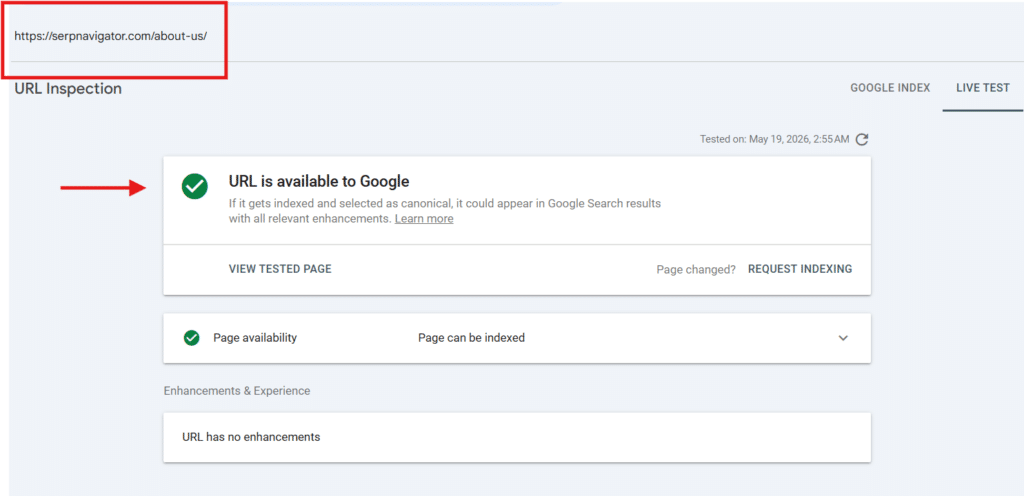
Before you fix anything, run the URL through URL Inspection and click “Test Live URL.”

Sometimes the page is already indexed and the Page Indexing report is just lagging by two or three days. Fix nothing if there is nothing to fix.
The Real Causes (and How to Fix Each)
When the status is not fine, the cause is one of the five below. Check them in this order. Most people stop at the first one that sounds right, rewrite the page, and move on. Half the time the real cause is further down the list.
My first question is never “how do I rewrite this.” It is “did Google have a reason to index this in the first place.” People start fifty-page rewrite projects the moment they see this status. The real cause is usually something else, like missing internal links or a rendering problem.
Page-Level Quality
The SERP’s main answer. Sometimes it is right. The page is thin, derivative, or genuinely worse than the top three results for the target query.
Word count matters less than relevance and originality. Google compares your page to what is already ranking, not to a fixed threshold.
Indexing standards have tightened because of AI-generated content in search results. Pages that read like a generic SEO blog rewritten by a language model are exactly what Google’s systems are now built to skip.
Fix: Open the SERP for your target query and read the top three results. Then ask: does your page bring something they do not? A specific case, a contrarian framing, a dataset, infographics, a worked example, a sharper structure? If the honest answer is no, rewrite to add what is missing. If the page cannot be made that good, merge it into a stronger existing page or accept the exclusion.
Site-Wide Quality Patterns
Google often looks at your whole site, not just one page at a time, when deciding whether to index something. A weak section (an old archive, a set of cookie-cutter landing pages, or a scraped FAQ block) can drag down indexing for the rest of the site, especially when Google keeps finding low-value URLs on the same domain.
Most of the time, the problem is not one bad page. It is a whole section Google does not trust, pulling the rest of the site down with it. Picture a SaaS site with 200 strong resource pages and 4,000 thin pages that are basically the same template repeated for different cities or keywords. The 200 good ones take the indexing hit until somebody noindexes or removes the 4,000 weak ones.
Fix: find the thin sections of your site. Merge them, noindex them, or delete them, instead of rewriting them one page at a time. A “delete” or “noindex” decision usually beats a “rewrite” decision on how fast you see results, because Google re-checks your overall site quality faster than it re-checks each page.
Weak Internal Linking and Click Depth
A page with no internal links from the rest of your site is telling Google the page does not matter. A page buried five or six clicks deep from the homepage sends the same signal. Google has said internal linking is one of the things it looks at when deciding to index, and most site audits confirm it.
Three clicks from the homepage is a rough limit for most content sites. Pages you want indexed should be reachable in three clicks or fewer, ideally from a main page or category page that Google visits often.
The most common version of this: a post gets one internal link from the category archive when it is published, and nothing newer links to it for the next twelve months. That is the whole problem. Add links from your newer posts. Do not rewrite the page.
Fix: add two to four relevant internal links from related pages that already get traffic. If the page is buried five or more clicks deep, link to it from a main page, add it to your navigation, or surface it through a sidebar widget. The goal is not to stuff keywords into the link text. It is to tell Google this URL matters enough to be in the index.
Rendering and JavaScript
A lot of modern site templates load important parts of the page using JavaScript. Headers, main text, product descriptions, and category lists often only show up after the first version of the page has loaded. If Google’s renderer (the tool it uses to load and look at your page) skips or stalls on the JavaScript, the page looks empty to Google. An empty page is a strong signal not to index.
Third-party scripts make this worse. A marketing tag or analytics script that blocks its own files in robots.txt can break the whole page rendering for Google.
The version that catches people: a JavaScript template that hides the body or product description inside a tab. A real visitor clicks the tab, the content loads, no problem. Google’s renderer never opens the tab. The page looks nearly empty to Googlebot.
Fix: in URL Inspection, click “View Tested Page” and check the HTML Google saw and the screenshot it captured. Compare it to what a real user sees in a browser. If important content is missing from Google’s view, the fix is technical: pre-render the page on the server, render the important parts server-side, or move them out of the JavaScript code entirely. Talk to your developer if this is not something you can fix yourself.
Duplicate or Near-Duplicate Signals
Google picks one canonical winner (the version it treats as the main URL) among similar pages and leaves the rest out. Canonical tags are hints to Google, not orders. Google can and does override them when the signals on your page conflict with what you set.
Two situations trigger this.
- First, near-duplicate pages. Two product variants, two city pages, or two articles saying roughly the same thing, where Google picked the wrong one as the main version.
- Second, pages that other URLs redirect to (301 redirects). These can slip into this status when Google crawls them less often over time.
Ecommerce sites do this constantly: a separate URL for every color, every size, every fit, when one URL with a dropdown to choose the variant would do the job. Google picks one variant on its own as the main version, and the rest end up in this status.
Fix: set canonical tags correctly and keep them consistent everywhere (sitemap, hreflang for language versions, internal links). For near-duplicates, merge them into one strong page instead of keeping two weak ones. For redirect destinations, make sure the destination page has strong internal links from elsewhere on the site.
How I Would Triage This in a Real Audit
I have been doing it for like eight years and below is the fastest method I follow instead of rewriting each page again..
- Export all affected URLs from GSC. The Page Indexing report only lets you export 1,000 URLs at a time. If you have more than that, pick examples from each different URL pattern instead of pulling the first 1,000.
- Separate important URLs from junk URLs. Pages that bring in sales, main guides, and recently published content go in one list. Tag pages, old archives, filter URLs with parameters, and old product variants go in another. The junk list usually does not need fixing.
- Run URL Inspection on a few examples from your important list. Make sure the status is still current. The report sometimes lags by two or three days, and the URL is already indexed.
- Check internal links and click depth for the important URLs. Zero internal links, or pages sitting five or more clicks deep, are the easy wins.
- Check the rendered HTML. Open “View Tested Page” and compare what Google saw with what loads in a real browser. If the main content is missing from Google’s version, the problem is in the code, not the content.
- Check canonical and duplication patterns. Look for near-duplicate pages, redirect destinations that Google is crawling less often, and canonical tags that do not match across your sitemap and internal links.
- Only then decide what to do: rewrite the page, merge it into another page, noindex it, add internal links, or leave it alone. Most URLs in your junk list should be noindexed or removed from the sitemap. Most URLs in your important list need a structural fix (links, rendering, or canonical tags) before you touch the content.
Rewriting comes last. If everything structural is fixed and the page still does not index after three to four weeks, then the content is the real problem.
What Not to Do
Make sure you do not repeat the mistakes every beginner makes. These look productive but they are not.
- Do not click “Validate Fix” over and over. It tells Google you have fixed something, but it does not trigger a fresh crawl. Click it once after you fix the real problem, then wait a few days. Clicking more times will not move you up the queue.
- Do not use the Indexing API for general content. Google’s own documentation says the Indexing API is only for job postings and live event listings. If you submit a regular blog post or product page through it, you are telling Google you are misusing the API, and you risk a penalty. Plugins that promise “instant indexing via the API” are bending the rule.
- Do not panic about the crawl budget. Google has said most sites with under one million pages, or under ten thousand pages that change often, do not need to worry about crawl budget. If you are smaller than that and someone is telling you to optimize crawl budget, you are reading the wrong advice.
- Do not chase a word count target. Write to be genuinely better than the top three pages ranking for your keyword, not to hit 1,500 words. A 900-word page that says something specific beats a 2,000-word page that says nothing.
Final Thoughts
The automatic “rewrite the content” fix is the wrong starting move for most “crawled, currently not indexed” cases. Sometimes the page is fine and the status is normal.
Sometimes the page is fine and the cause is somewhere else: missing links, rendering problems, duplicate signals, or a weak section dragging down the rest of the site.
Work through the causes in order. Rule out “this is fine” first, then check links and click depth, then rendering, then duplicate signals, then site-wide patterns. Only after all of that, look at the content itself.
Rewriting is the last move, not the first. Sites that stay unindexed for months are usually sites that rewrote the wrong thing for months.
In 2026, not being indexed costs you more than just Google traffic. It also keeps your page out of AI tools like ChatGPT, Claude, and Perplexity, which pull from Google’s index for their citations.
The cost of not being indexed has changed. The way you diagnose this has to change with it.


